Real People. Real Answers.
We're a small US-based team that takes pride in helping every merchant. Call, text or email and you'll reach someone who knows the system inside and out.
We're Here to Help
- 561-325-8939Call or text us directly
- support@eshiprate.comWe usually reply within a few hours
- Contact formSend us a message and we'll get right back to you
- After-hours emergenciesUrgent problem outside business hours? Emergency support is available.
Business Hours
| Monday - Friday | 9:00 AM - 5:00 PM ET |
| Saturday - Sunday | Closed |
| Emergencies | After-hours support available |
Already a customer? Log in to your eShipRate admin. Forgot your password? Use the reset link on the log in page.
Help Is Built Right In
Click "Help" on any page of the eShipRate admin and the guide for that page opens beside it, with a how-to video. Search all 40 guides, or ask the AI Assistant.
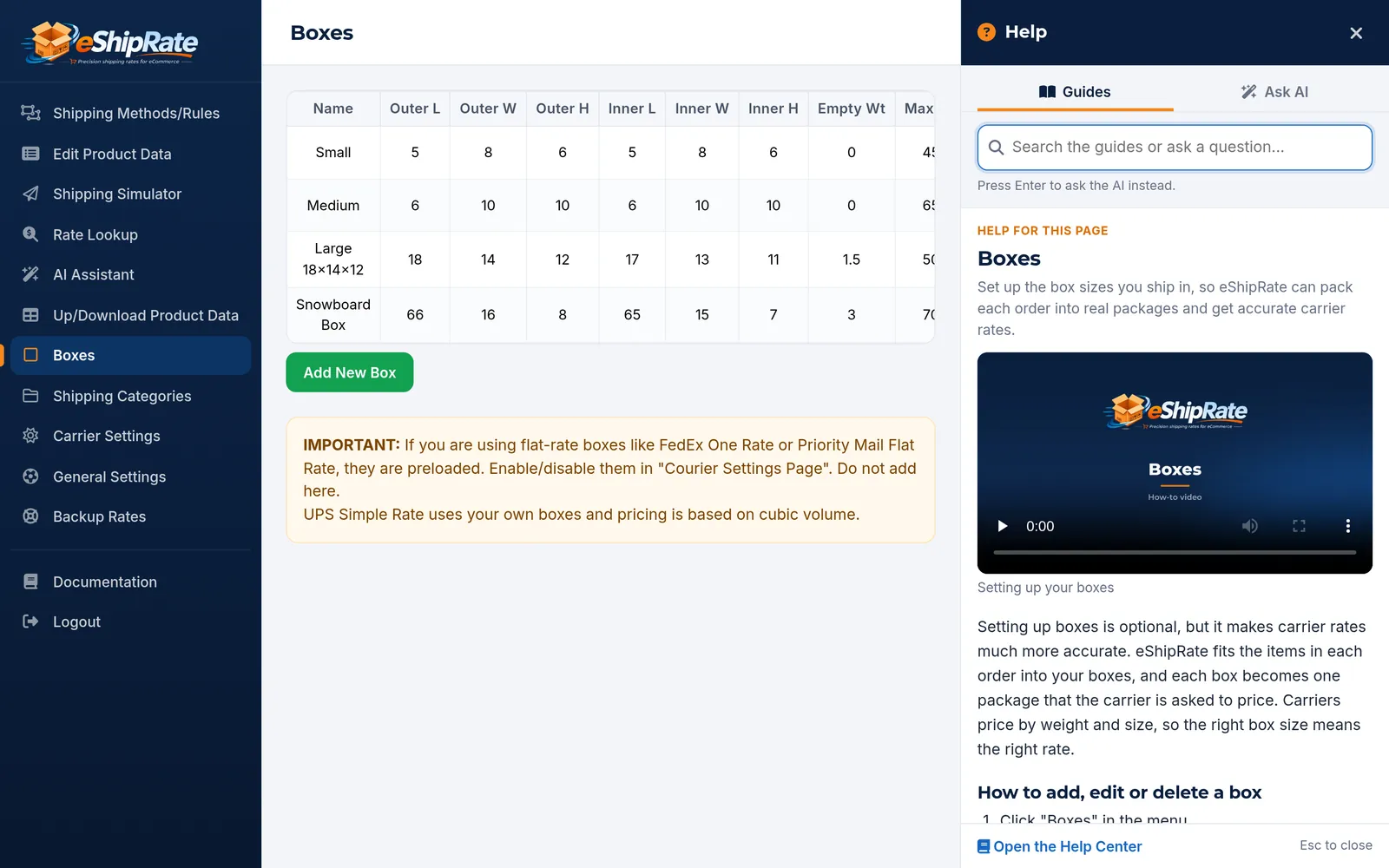
- Guides for every page and setting, written in plain English for store owners
- How-to videos for the main pages, right in the panel
- Shipping Simulator to test any cart before your customers do
- Rate Lookup to see how any recent checkout was priced
- AI Assistant to answer how-to questions and make changes for you (selected stores)
- A real person to help you set up your rules, whenever you want one
Watch the Setup Video
See how to get eShipRate up and running: setting your ship-from address, adding boxes, turning on carriers and testing your rates.
Getting Started on Your Platform
Shopify
Search for "eShipRate" in the Shopify App Store and click Install. Billing is handled directly through Shopify, with a 14-day free trial.
Shopify App Store →BigCommerce
Find "eShipRate" in the BigCommerce App Marketplace and install. Contact us to set up billing when you're ready to go live.
BigCommerce Marketplace →WooCommerce & Turbify
Contact us directly and we'll do the install. Most stores are up and running within 24 business hours.
Contact us →Frequently Asked Questions
What does eShipRate actually do?
When a customer enters their address at checkout, your store asks eShipRate for shipping rates. eShipRate splits the cart by where each item ships from, picks the right shipping rule for each of your shipping methods, packs the items into your real boxes, gets live rates from UPS, FedEx or USPS (or uses your own rate tables), applies your handling, markups, flat rates and free-shipping offers, and sends back one accurate price for each method, usually with a delivery date.
My products ship from different warehouses and dropshippers. Can it handle that?
Yes, that is what it was built for. Give each product its ship-from zip code. When an order contains items from several locations, each shipment is packed and priced from its own location, with its own rule and carrier, and the shipments are added together into the price your customer sees.
Which store platforms does eShipRate work with?
eShipRate works with Shopify and BigCommerce (install it from their app stores), and with WooCommerce and Turbify (formerly Yahoo Stores), which we install for you. If your platform lets outside apps supply shipping rates, we can probably connect it too. Just ask.
How much does it cost?
One plan: $85 per month, with every feature, every carrier, unlimited products and unlimited shipping rules. No setup fees, no tiers and no long-term contract. Every new store gets a 14-day free trial, on Shopify, BigCommerce and Turbify. Shopify stores are billed through Shopify.
What is the AI Assistant?
A helper inside the eShipRate admin that you talk to in plain English. Tell it how you want shipping to work and it proposes the changes; nothing is saved until you click Apply, and every change can be undone. It can run real test checkouts to confirm the result, explain why a recent checkout got its price, and answer how-to questions. It is turned on for selected stores, so ask us if you would like to use it.
How do I find out why a customer was charged a certain amount?
Open Rate Lookup in the admin and type the customer's zip, name or address. Every checkout from the last 3 days is there, with the rule used, the boxes and what went in each (with a 3D view), the carrier rate and every extra charge.
Does my Shopify plan support eShipRate?
Shopify only shows rates from shipping apps like eShipRate when third-party calculated shipping rates are turned on for your store. They are included on the Advanced and Plus plans. On other plans Shopify usually offers them with annual billing or as a paid add-on.
Not sure what your store has? Call or text us at 561-325-8939 and we will check it with you.
Do I need my own UPS, FedEx or USPS account?
No. eShipRate can show standard retail rates right away. If you have negotiated rates with UPS or FedEx, add your account details in the carrier settings and your customers will see your discounted rates instead.
Will it change how my checkout looks?
No. The rates appear in your store's normal checkout, in place of the platform's built-in shipping calculator. Your customers just see accurate prices and delivery dates.
How do I get my product sizes and weights in?
eShipRate pulls your products from your store automatically, and Shopify and BigCommerce send each item's weight with every cart. You can add sizes, ship-from zips and other shipping settings one product at a time in a grid, or download a spreadsheet, fill it in and upload it back in one go.
What if a carrier is down?
Set up backup rates ahead of time. If no rates come back, or UPS or FedEx does not answer, your backup rates are offered so customers can still check out.
What if I need help setting it up?
That is what we are here for. Every page in the eShipRate admin has a Help panel with a plain-English guide and how-to video, and you can call, text or email a real person on our US-based team. We are happy to set up your rules with you.
Can I cancel anytime?
Yes. There is no contract. On Shopify, removing the app cancels your billing automatically. On other platforms, just let us know.
Can eShipRate quote LTL freight?
Yes, on request. We can connect national and regional LTL carriers like XPO, Estes, Old Dominion, Saia and R+L, and route only your large items to freight while everything else ships by parcel. See Integrations.
Still Have Questions?
Call or text 561-325-8939, or send us a message. A real person will answer.